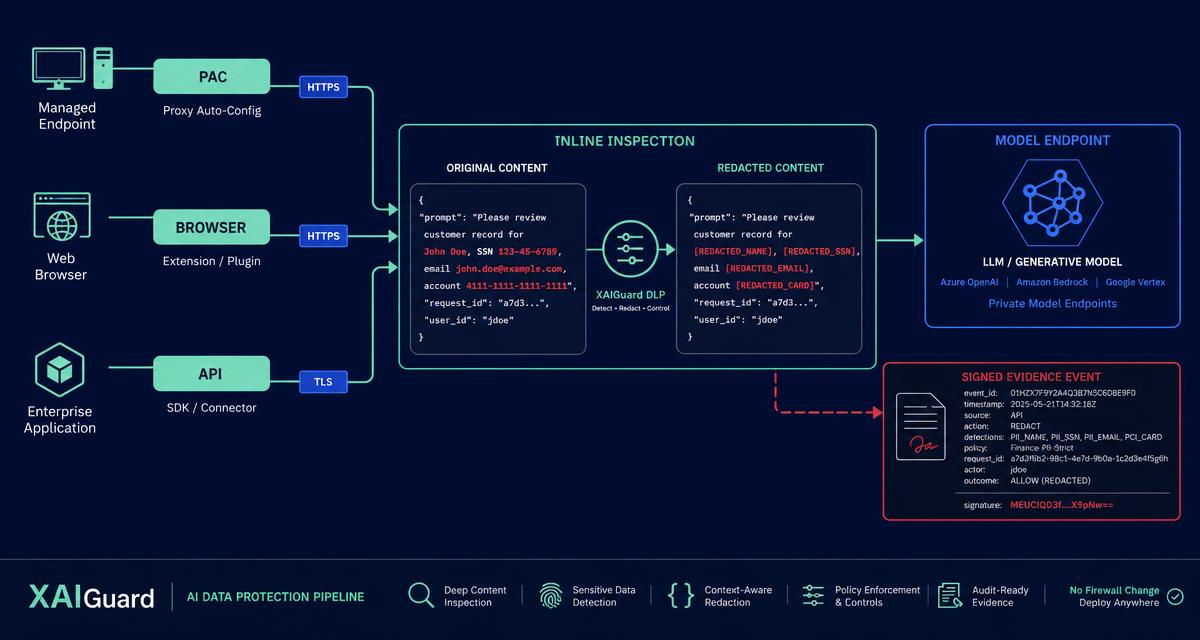
The hardest part of deploying AI data-loss prevention is rarely the detection logic. It is the change ticket. Any control that requires a new inline device at the network edge inherits the release calendar of the network team, and a control that ships next quarter does nothing about the contract someone pastes into an assistant this afternoon.
There are three practical ways to inspect prompts before they leave, none of which requires touching the firewall. They cover different populations, fail in different ways, and are best deployed in a specific order.
Path one: the PAC file
A proxy auto-config file is a small JavaScript function that tells a browser which requests to send through a proxy. It is one of the oldest mechanisms on the web and one of the least glamorous, which is precisely why it works: every managed browser already supports it, and it is distributed through tooling you already operate — Windows Group Policy for domain-joined machines, an MDM configuration profile for macOS.
How it works in practice. You generate the PAC file from the console, scoped to the AI destinations you want governed. You push it with GPO (a registry setting) or MDM (a configuration profile). Matching traffic routes through XAIGuard enforcement, where prompts are scored, redacted or blocked. Everything else continues to go direct, which keeps the blast radius of the change small.
What it is good for. Broad organisational coverage without touching the network edge. If your goal is "every managed laptop, this week," this is the path.
Where it falls short. PAC applies to managed devices with managed browser policy. It does not help on an unmanaged contractor laptop, and a determined user can work around browser proxy settings on a device they administer. It also governs at the network layer, so it sees the request rather than the user's intent — which is fine for enforcement but less rich for user-facing feedback.
Path two: the browser extension
A Manifest V3 extension for Chrome, Edge, Brave and Arc inspects prompt content locally, in the page, before submission to major assistants. Detection runs against built-in detectors plus your own custom patterns; when something matches, the user sees the block at the moment of the paste, and the event is reported to your tenant and written to the audit chain.
What it is good for. Fast pilots and BYOD. There is no network dependency and no proxy path to arrange, so a pilot group can be live in an afternoon. It is also the only one of the three paths that can give the user an explanation in context — "this looks like a customer account number" — at the moment they are about to make the mistake. That in-context feedback is the single most effective behaviour-change mechanism in the set.
Where it falls short. Coverage is per-browser and per-profile. It governs the assistants it knows about, not arbitrary API traffic, and it depends on the extension staying installed. Manage it through enterprise extension policy rather than asking people to install it themselves.
One honest note on availability: the Chrome Web Store listing is in review. The signed package is available for managed install today, which is the deployment mode most enterprises want anyway.
Path three: the API proxy
The third path governs machines rather than people. XAIGuard exposes an OpenAI-compatible endpoint; you change one base URL in your SDK configuration and every model call your applications and agents make is scored, redacted or blocked on the way through.
What it is good for. Your own applications, your RAG pipelines and your agents. This is where the highest-volume, highest-consequence traffic usually lives — a production feature that summarises customer records makes more model calls in an hour than your whole staff makes in a week, and it does so without a human reviewing each payload.
Where it falls short. It only covers callers you can reconfigure. It does nothing for a person in a browser, which is why it is a complement to the first two paths rather than a substitute.
Comparing them side by side
Think about the three axes that actually drive the decision:
- Population covered. PAC covers managed browsers org-wide. The extension covers browsers where it is installed, including unmanaged ones. The proxy covers code.
- Network change required. None for any of the three. That is the point.
- Off-network behaviour. The extension keeps working on a home network. PAC follows the browser policy, so it generally does too on a managed device. The API proxy is a base-URL change and is location-independent.
- User feedback quality. The extension is best; PAC and API proxy return a verdict but not an in-page explanation.
The rollout order that works
Deploy in this sequence, and each step de-risks the next.
Day 0 — pilot with the extension. Pick a group with real exposure: legal, finance, or a customer-facing team. The extension is the fastest thing to install and the fastest thing to remove if the pilot goes badly, and the in-context blocks generate the anecdotes you will need later to justify the wider rollout.
Week 1 — tune the policy. Every environment has its own false-positive profile. Internal reference numbers look like account numbers. Test fixtures look like credentials. Spend the first week reading verdicts and adjusting rules, in plain-English policy terms rather than regular expressions, before anyone outside the pilot feels the control.
Week 2 — go org-wide with the PAC file. Once the policy is tuned, coverage becomes a distribution problem, and GPO or MDM solves distribution. Because the policy has already been calibrated against real traffic, the org-wide step generates far fewer help-desk tickets than it would have on day one.
Week 3 — put your own applications behind the API proxy. By now the policy set is stable and the audit trail is producing exportable evidence. Changing one base URL brings your own AI features under the same rules your people are already working under, which is also the point at which the compliance story becomes coherent: one policy, one verdict format, one audit chain, three enforcement points.
The trade-off nobody mentions
Running all three is not redundancy — it is coverage of three genuinely different populations, and most enterprises end up with all three within a month. The trade-off is not between the paths. It is between shipping something narrow this week and shipping something comprehensive eventually. Narrow-this-week wins, provided the narrow thing is on a path that widens.
If you would like to see the three paths running against your own prompts before you commit to any of them, request a demo.